flick is the traffic controller for every link on your Mac.

Set flick as your default browser once. From then on, every link you click in Mail, Slack, Notes, or anywhere else goes exactly where you want it: the right browser, or the right app, instantly.

THE PICKER
Click a link and a small panel appears at your cursor with your installed browsers. Press 1, 2, or 3 to open it there, Return for the highlighted one, Esc to cancel. Keyboard first and fully native.

RULES
Route known sites without asking. Send github.com to Chrome and youtube.com to Safari, with optional path prefixes for finer control. Or skip the syntax entirely and type it like a text message: "send teams links to the Teams app" compiles into a rule you review before adding.

LINKS THAT OPEN APPS, NOT TABS
Links owned by Teams, Zoom, Figma, Notion, Spotify, Linear, and Discord can open the installed app directly. flick also learns your apps: click a loom.com link with Loom installed and flick offers the app right in the picker. Teach it once and every future link goes straight there.

A ROUTER THAT LEARNS
The picker preselects the browser you usually choose for each site. Turn on automatic routing and near certain links open silently, always with an undo notification. Meetings, video, docs, code, and design links can each route by what they are, not just where they point.

LINK SCAN
Shorteners resolved, lookalike domains flagged, tracking parameters stripped before opening. See where a link really goes before you commit.

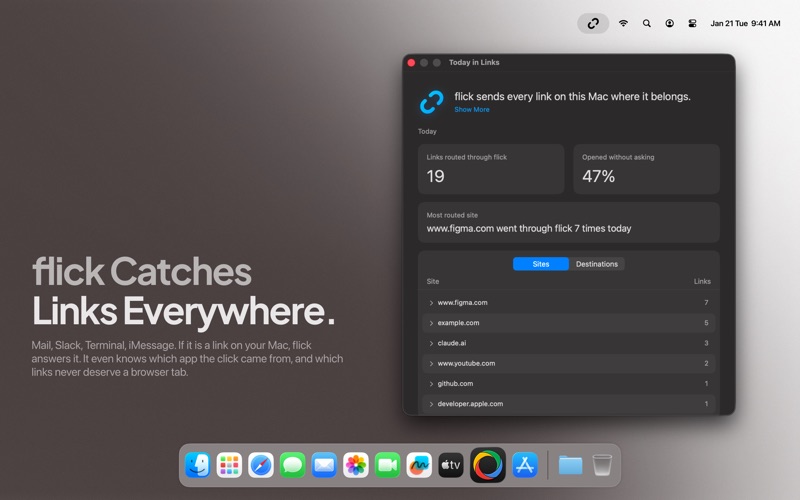
YOUR DAY IN LINKS
A daily digest shows what flick handled for you: top sites, destinations, and how much never needed a picker at all. Press one shortcut to route every link from your clipboard at once.

PRIVATE BY DESIGN
Everything runs on your Mac. Learning data is hosts and chosen browsers only, never full URLs, and it never leaves your machine. Optional Claude powered features use your own API key, stored in your Keychain. No accounts, no analytics, no telemetry.

FLICK PRO
flick is free, and stays free. The picker, your rules, and tracking cleanup keep working at no cost, forever. Every Pro feature is unlocked free for 14 days from first launch, with no account and no card. When the trial ends, flick Pro unlocks the rest: plain English rules, unlimited rules, the learning router, native app routing, Link Scan, intent routing, Today in Links, and Route Copied Links. Choose what fits you:

flick Pro Monthly: an auto renewable subscription, 1 month, $1.99 per month.
flick Pro Yearly: an auto renewable subscription, 1 year, $14.99 per year.
flick Pro Lifetime: a one time purchase, $39.99, every Pro feature forever with no renewal.

SUBSCRIPTION DETAILS
Payment is charged to your Apple Account at confirmation of purchase. Each subscription renews automatically unless auto renew is turned off at least 24 hours before the end of the current period. Your account is charged for renewal within 24 hours prior to the end of the current period, at the price stated above. You can manage your subscriptions and turn off auto renew in your Apple Account settings at any time after purchase. The flick Pro Lifetime option is a one time purchase and does not renew.

Privacy Policy: https://clickflick.site/privacy
Terms of Use (EULA): https://clickflick.site/terms