Drop a comic on your Mac. Get a perfect EPUB. No uploads. No accounts. No waiting.

ComicToEPUB converts CBZ, CBR, and ZIP comic archives into EPUB files entirely on your Mac — fast, private, and ready for your Kindle, Kobo, reMarkable, Apple Books, or Google Play Books library. Every pixel stays on your machine.

FEATURES

Core Conversion
• Convert CBZ, ZIP, and CBR archives to EPUB 2.0 or EPUB 3.0 — your choice
• Drag-and-drop a single file or queue dozens at once
• Natural page ordering so your comics always read in the right sequence
• Validation before conversion catches corrupted files before they waste your time

Smart Metadata
• Reads embedded ComicInfo.xml to fill in title, series, volume, author, and language automatically
• Parses filenames intelligently — "Batman v01.cbz" becomes Series: Batman, Volume: 1 in your EPUB
• Detects manga and Japanese content and suggests right-to-left layout automatically
• Set your target reader once (Kindle, Kobo, reMarkable, Apple Books) and every file in that batch or folder uses the matching optimised profile automatically

11 Built-in Device Profiles
Every profile is tuned to the exact screen dimensions and format requirements of the device — no guesswork:

Kindle
• Kindle Comic
• Kindle Scribe — larger pages for Scribe-class screens
• Kindle Colorsoft — colour-safe output for Kindle colour displays

Kobo
• Kobo Clara EPUB
• Kobo Libra Colour EPUB

reMarkable
• reMarkable 2 EPUB — colour-preserving for reMarkable-class screens
• reMarkable 1/2 Monochrome EPUB — explicit grayscale for black-and-white hardware
• reMarkable Paper Pro Color EPUB

Reading Apps
• Apple Books — highest quality, EPUB 3, up to 4096 px
• Google Play Books — EPUB 2 with automatic split to stay inside upload limits
• Manga — right-to-left layout for manga and RTL comics

Batch Conversion (Premium)
• Convert two comics simultaneously — large queues finish in half the time
• Stop the entire batch at any point with a single click
• Your queue survives crashes and force-quits — every file you added is still there when you relaunch
• Re-run any past job from conversion history with one click

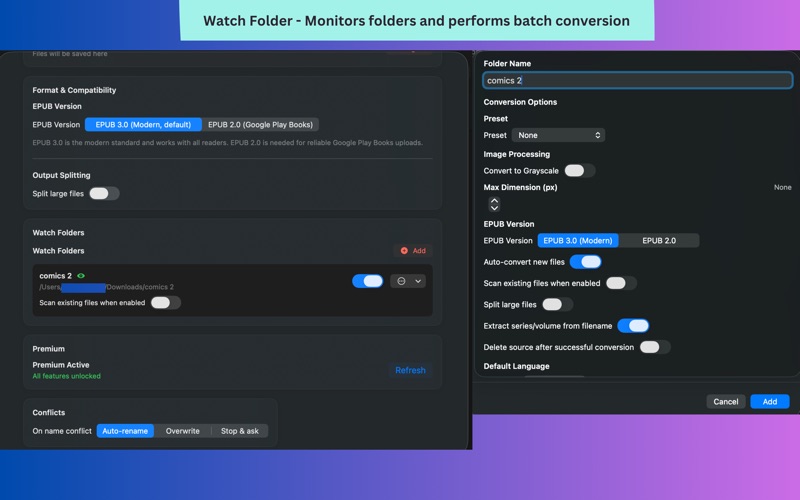
Watch Folders (Premium)
• Point the app at a folder and it converts every new comic that lands there automatically
• Set a target reader per folder — new files are converted with the right profile without any manual steps
• Live progress badge shows exactly what is converting right now
• Duplicate detection prevents re-converting files you have already processed

Advanced Image Processing
• Resize images to reduce file size while preserving detail
• Grayscale conversion for e-ink devices — improves readability and shrinks file size
• Accurate split-size estimation keeps Play Books parts within the 100 MB limit

Privacy and Security
• 100% local — nothing leaves your Mac, ever
• Full macOS sandbox compliance
• No account, no sign-up, no analytics

FREE — TRY BEFORE YOU UPGRADE
Convert one file at a time, free, forever. No time limit, no trial period:
• Single file conversion — CBZ, CBR, and ZIP
• EPUB 3.0 output (default; EPUB 2.0 selectable in Settings)
• ComicInfo.xml and filename metadata auto-fill
• Conversion history with one-click re-run
• Output includes a small "ComicToEPUB Free" watermark on each page

PREMIUM — ONE-TIME PURCHASE
Upgrade once and unlock everything, forever:
• Watermark-free output
• All 11 device presets — Kindle, Kobo, reMarkable, Apple Books, Play Books, Manga
• Batch conversion — process two files at once with crash-safe queue
• Watch Folders — automatic conversion with per-folder device targets
• Advanced split sizing and naming options

ComicToEPUB is built for readers who take their library seriously. One app, every device, zero compromise.

FEEDBACK AND SUPPORT
Spotted a bug or have an idea for a new feature? We read every message.
Email: [email protected]

Terms of Use: https://www.apple.com/legal/internet-services/itunes/dev/stdeula/