



Description
QC Buddy is the quality control tool built for video professionals
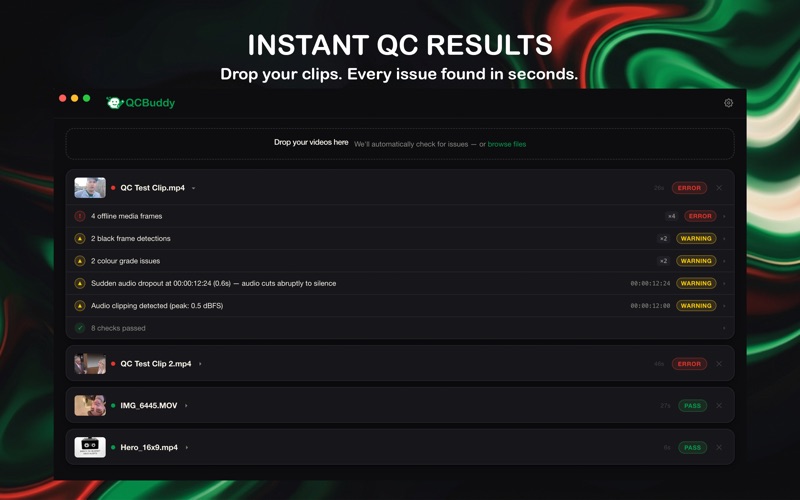
QC Buddy is the quality control tool built for video professionals. Drop your files and get a detailed fault report in seconds. No cloud processing, no waiting, no guesswork.

Free to download, with a single QC Buddy Pro upgrade when you need the full toolkit. Never a subscription.

WHAT QC BUDDY CHECKS

Video
Resolution and aspect ratio
Frame rate and variable frame rate (VFR)
Video range (limited vs full)
HDR detection
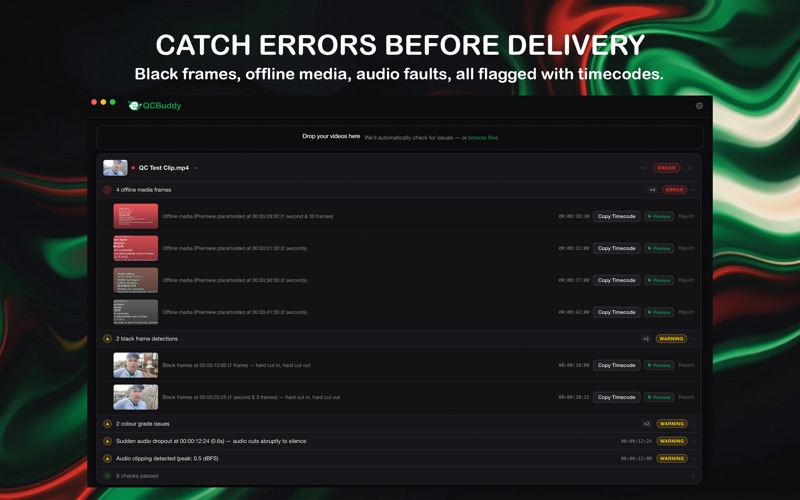
Black frames and flash frames
Photosensitivity: rapid luminance flashes, red flashes, and sustained high contrast patterns
Frozen or stuck frames
Offline / disconnected media
Decode errors and corrupt frames
Colour grade issues: flat, clipped, or unusual casts
Edge blanking: pillarboxing, letterboxing, and overscan
Illegal white levels above 100 IRE

Audio
Silence and audio dropouts
Clipping and distortion
Loudness (LUFS) against broadcast standards
Phase issues
Channel imbalance
Low audio levels

Burnt In Subtitles
Spelling errors in burnt in captions and lower thirds, frame by frame
Choose your dictionary: UK English, US English, and more
Project allowlist for brand names, surnames, and proper nouns

TIMECODE ACCURATE RESULTS
Every issue is reported with the exact timecode and a frame preview so you can jump straight to the problem in your editing software.

WATCH FOLDERS
Set QC Buddy to monitor a folder and it will automatically analyse every new video file that lands there. Ideal for ingest pipelines and busy post workflows.

FRAME.IO UPLOAD
Connect your Adobe account and send checked files straight to any Frame.io project or folder without leaving QC Buddy. Optionally post the QC summary as a comment so reviewers see the report alongside the file.

VIMEO UPLOAD
Connect your Vimeo account and upload checked files straight to Vimeo without leaving QC Buddy. Grab a shareable link the moment the upload finishes, or jump to the video's manage page in a click. (Uploading requires a paid Vimeo plan.)

QC STATS
Track your scanning activity over time: files checked, issues caught, hours saved. Synced via iCloud so your numbers follow you across every Mac you sign in on.

LIVES IN YOUR MENU BAR
QC Buddy runs quietly in the background. Check the status of any job from the menu bar without opening the main window, and drop files directly onto the icon to queue them instantly.

EXPORT YOUR REPORT
Share a polished PDF report with your client, or export an XML markers file that imports directly into Premiere Pro with every issue placed at the right timecode.

BUILT FOR PROFESSIONALS
Designed for editors, post houses, and delivery teams who can't afford to send a broken file to a client. Fast, accurate, and unobtrusive.

ON DEVICE ANALYSIS
All analysis runs entirely on your Mac using Apple's AVFoundation framework, so your footage is never sent to a server to be scanned. Files only leave your Mac if you choose to upload them to Frame.io or Vimeo. Fast, private, and secure.

CUSTOMISABLE CHECKS
Enable, disable, and reorder individual checks to match your delivery requirements. Set your own loudness targets and spelling dictionary.

HELP US IMPROVE
Spotted a false detection? Tap the report button to flag it. Got a bug or feature idea? Send it from the built in feedback form. Every piece of input goes to our team and shapes the next release.

FREE & PRO
QC Buddy is free to download and use. Black frame, freeze frame, offline media, audio clipping, and silence detection are all included.

Unlock QC Buddy Pro with a single purchase, no subscription and yours forever, to add:
• Burnt in subtitle spell check
• Upload to Frame.io and Vimeo
• Watch folders
• Batch and folder scanning
• Broadcast checks (LUFS loudness, illegal levels, flash / photosensitivity)
• PDF and XML report export

Terms of Use: https://www.apple.com/legal/internet-services/itunes/dev/stdeula/
