qTxt App - Functionality Overview
Description:
qTxt (quick text) is a powerful iOS application designed to convert speech to text with advanced editing and organization capabilities
qTxt App - Functionality Overview

Description:
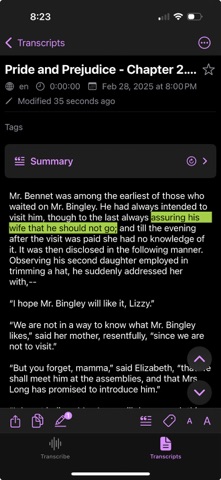
qTxt (quick text) is a powerful iOS application designed to convert speech to text with advanced editing and organization capabilities. The app provides a seamless experience for transcribing audio files, managing transcripts, and organizing content through tags and highlights. Simply select text and tap highlight icon to create a new highlight, or tap the tag icon to create a new tag.

Key Features:

1. Audio Transcription
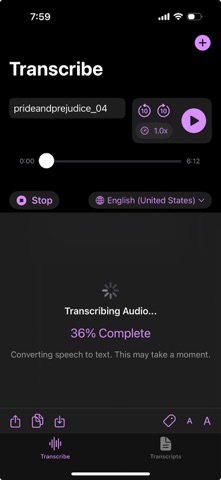
   - Support for multiple audio file formats (MP3, WAV, M4A, AIFF)
   - Real-time transcription progress indicator
   - Multiple language support with offline capabilities
   - Adjustable playback speed
   - Background audio processing

2. Transcript Management
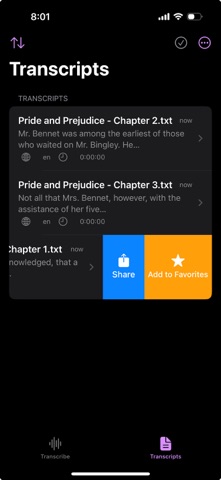
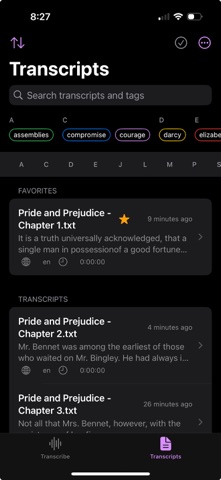
   - Organized transcript list with sorting options
     * Date (newest/oldest)
     * Title (A-Z/Z-A)
   - Bookmark important transcripts
   - Export options (PDF, TXT)
   - Share functionality
   - Delete with confirmation

3. Text Editing & Enhancement
   - Text size adjustment
   - Copy text functionality
   - Smart text selection
   - Multi-language support

4. Organization Features
   - Tagging system
     * Select text and tap tag icon to create tag
     * Create custom tags
     * Color-coding
     * Tag filtering
     * Tag management
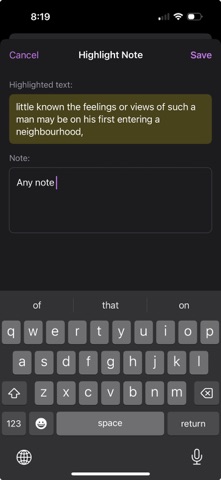
   - Highlighting system
     * Select text and tap highlight icon to highlight
     * Custom color highlights
     * Add notes to highlights
     * Highlight management
     * Quick navigation through highlights

5. Smart Features
   - Automatic summary generation
     * Quick summary
     * Detailed summary
     * Bullet points format
   - Language detection
   - Offline speech recognition support
   - Progress tracking
   - Auto-save functionality

6. User Interface
   - Modern SwiftUI interface
   - Dark mode support
   - Dynamic type support
   - Haptic feedback
   - Gesture controls
   - Intuitive navigation
   - Loading indicators
   - Progress feedback

7. Data Management
   - Local storage
   - iCloud sync capability
   - Backup functionality
   - Data persistence
   - State restoration

8. Accessibility
   - VoiceOver support
   - Dynamic type compatibility
   - High contrast support
   - Keyboard navigation
   - Accessibility labels

9. Performance Features
   - Background processing
   - Efficient memory management
   - Quick loading times
   - State preservation

10. Security
    - Secure file handling
    - Privacy-focused design
    - Local processing when possible
    - Secure data storage

Technical Requirements:
- iOS 15.0 or later
- Internet connection for online transcription
- iCloud account for sync features
- Sufficient storage space for audio files and transcripts

Note: Some features may require an internet connection or specific iOS capabilities. The app is designed to work offline when possible, with enhanced functionality available when online.