Smart Pointer PRO makes your presentations clear, expressive, and effortless.

It highlights your cursor with customizable shapes, adds a smooth motion trail, and gives you powerful tools like a built-in drawing mode — helping your audience instantly follow what’s happening on your screen.

Whether you're teaching, demonstrating a workflow, recording a tutorial, or presenting to a team, Smart Pointer PRO ensures your pointer is always visible and your message stays crystal clear.

Features
• Looks great. Feels intuitive.

Clean visuals, smooth animations, and instantly recognizable pointer highlights.

• Choose shape, size, and color

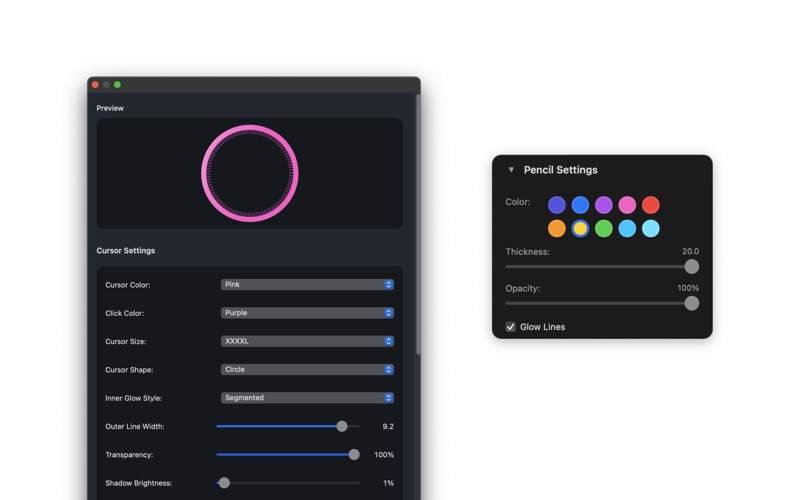
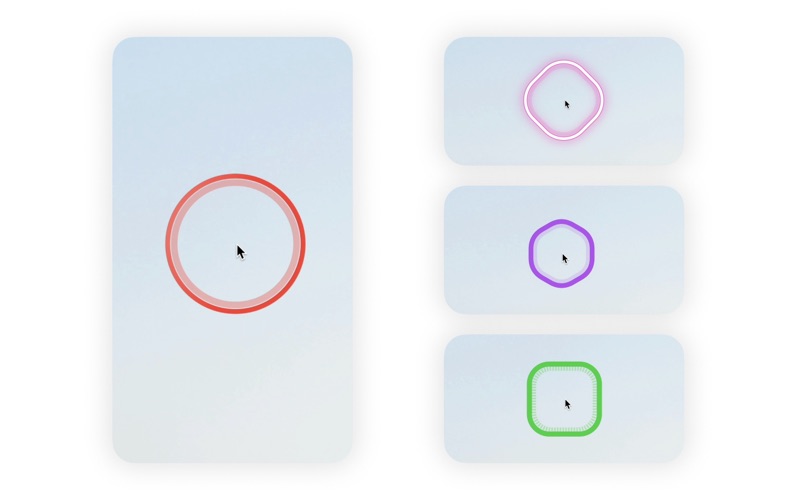
Pick from multiple cursor highlight shapes — circle, square, diamond, hexagon, soft-rounded forms and more.
Adjust the size and tune the color to match your style or presentation theme.

• Light or neon glow

Enable a soft highlight or switch to a bright neon glow effect for maximum visibility on dark backgrounds.

• Cursor trail

Reveal the path of your cursor with an elegant, fading trail that follows your movement.
Perfect for explaining sequences, demonstrating UI flows, or emphasizing interactions.

• Drawing mode

Turn your cursor into a pencil and draw directly on the screen.
Underline, circle, annotate — ideal for lectures, walkthroughs, and live demos.

• Never gets in the way

The cursor highlight intelligently adapts to your movement and stays unobtrusive when idle.

• Lightweight menu bar app

Always accessible, always ready, with minimal system footprint.

• Autostart

Launches automatically when you log in, so the highlight is always available when you need it.

• Customizable keyboard shortcuts

Instantly toggle the highlighter, trail, pencil and other tools with hotkeys you choose.

• Quick-toggle

Option-click the menu bar icon to instantly enable or disable Smart Pointer PRO.

• Designed for professionals

Crafted for teachers, presenters, designers, developers, and anyone who needs their audience to clearly see what is being demonstrated.

Use cases

• Presenting or teaching an app, workflow, product, or interface — your audience tracks the cursor effortlessly.
• Working remotely and sharing your screen — your teammate always knows where you point and what you highlight.
• Large displays or multi-monitor setups — never lose your cursor again.
• Creating tutorial videos, educational content, or UX walkthroughs.
• Conducting online meetings, demos, or training sessions in Zoom, Meet, Teams, or FaceTime.

Privacy

Smart Pointer PRO does not collect or send any data.
All cursor effects and drawing actions remain entirely on your device.

Compatibility

Works seamlessly with screen-sharing apps like FaceTime, Zoom, Google Meet, Teams, Skype, and more.
(Just share your whole screen — not a single app window — to display the effects.)