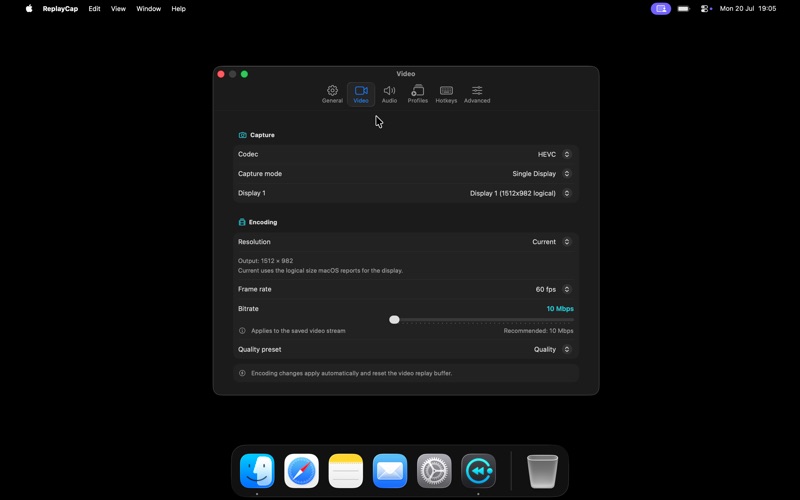
ReplayCap is a menu bar instant-replay clipper that saves moments after they happen
ReplayCap is a menu bar instant-replay clipper that saves moments after they happen.

It continuously buffers the last 15 seconds to 5 minutes of your screen and audio. When something worth keeping happens, press a hotkey and ReplayCap saves it as an MP4. If you’ve used instant replay on a gaming PC, you’ll feel right at home.

FEATURES
• Instant replay — save the last 15–300 seconds with a hotkey or click
• Extended replay — optionally keep rolling 5, 10, or 30-minute windows
• Dual-display capture — save displays side by side or as separate files
• Hardware-accelerated HEVC or H.264 — smooth recording at up to 60 fps
• High-resolution capture — record supported displays at their full pixel resolution
• Flexible audio — capture system audio, microphone input, or audio from a selected app
• Audio track options — merge audio into one track or keep tracks separate inside the MP4
• Clip library — preview, trim, rename, tag, favorite, search, share, crop, and export clips as GIFs
• Custom controls — configure six hotkeys, capture profiles, quality presets, and file-name templates

STAYS OUT OF YOUR WAY

ReplayCap lives in the menu bar. There are no project files, timelines, or unnecessary windows to manage. A live badge shows the recording state and buffered duration, so you always know when it’s ready.

You can configure ReplayCap to launch at login and begin recording automatically. Once set up, it stays out of sight until you need it.

PRIVATE BY DESIGN

Everything happens locally. Clips are ordinary MP4 files saved to a folder you choose. ReplayCap makes no network connections, so your recordings and activity never leave your computer.

GREAT FOR
• Gamers — save the boss fight, goal, or win after it happens
• Bug hunting — capture what just went wrong without trying to reproduce it
• Streamers and creators — pull out highlights without keeping hours of footage
• Anyone who has ever said, “I wish I’d been recording that”

Screen Recording permission is required.