风格

截图
4 张截图 网格- 版本
- 1.1.7
- 大小
- 4 MB
- 首次发布
- 2021年6月8日
- 分类
- 摄影与录像
应用介绍
来自 App Store 商店页VizRef Lite® for iPhone enables creatives to finally take their inspiration anywhere on their phones. *You can not use iPad multitasking features with the iPhone version of VizRef. Please Download VIZREF for use on iPad. * It becomes the perfect companion app for Procreate or paired with your favorite drawing/animation application by using your iPhone as a second monitor dedicated to references. Take your reference boards with you while you travel and draw in your sketchbook. Make visual reference boards with any images or gifs from web browsers, cloud storage, photos, screen captures and more. The first mood board creation app made by artists for artists, that brings comprehensive referencing tools to animators and visual artists. We are dedicated to bringing creatives what they need most in being inspired everywhere they go.
HIGHLIGHTS
-VIZREF LITE® version for iPhone has all the same in-app features as VIZREF on iPad ( Vizref Lite if used on IPad does not have multitasking features and is not fullscreen. For iPad please purchase VIZREF®
-Take your visual reference boards with you while you sketch at your favorite locations
-Perfect companion app paired with Procreate® Adobe Fresco ® Clip Studio Paint® Infinite Painter® etc. by utilizing iPhone as a second monitor along with an iPad
-Supports many image types including GIF
-Quickly copy and paste images from web
-Batch Import from Photos app
-Batch Export images from boards to cloud storage using Files app
-Import High-Resolution images with HD toggle
-*Focus on whats importing with Focus mode. ( rotate imageboard )
*Multi-Select and auto pack images for a quicker workflow *
-
-Import from iCloud, Dropbox, Google Drive
-Quick and responsive visual reference board experience
-Easy to use/ minimal UI
-Light mode and Dark mode
-Set thumbnails for reference boards to visually organize your inspiration
ANIMATED GIF SUPPORT
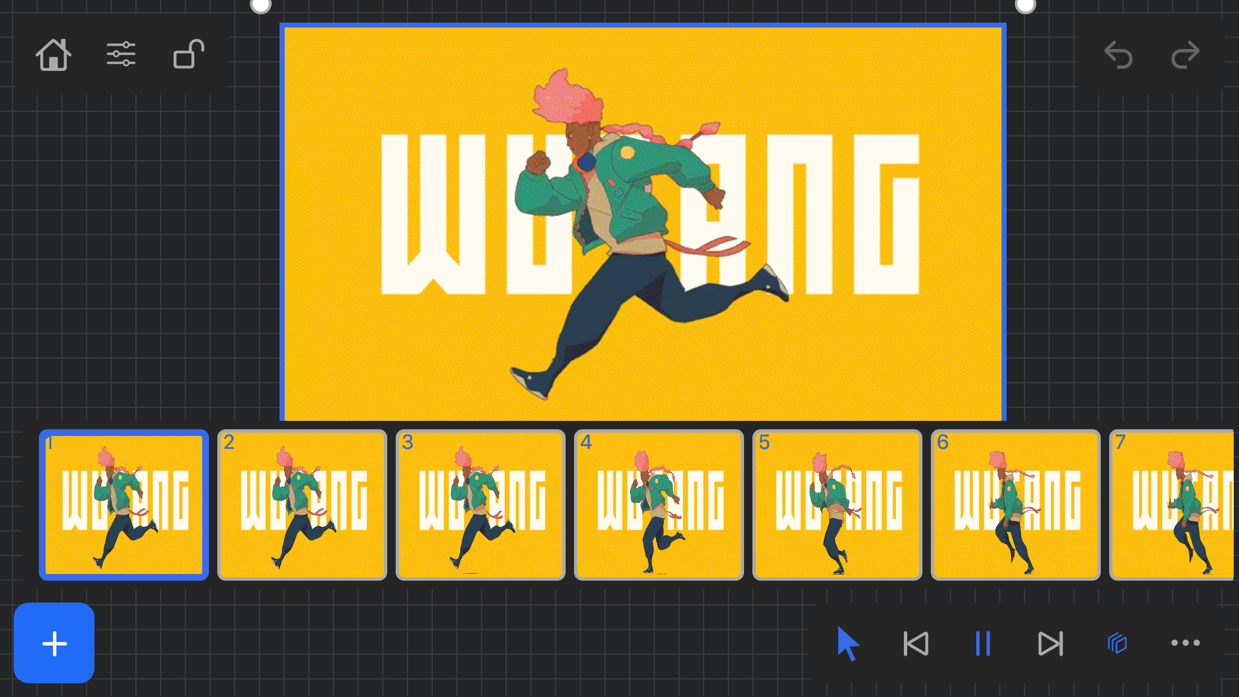
-Reference your favorite animated gifs
-Pause animation and play frame by frame to better understand referenced animations
-Advanced animation timeline gives you an interactive visual breakdown of all frames
EASY TO USE REFERENCE TOOLS
-Crop images to optimize screen space and view more references
-Greyscale toggle for images for value reference
-Flip horizontally and vertically
-Rotate Images
-Copy-paste images into other apps
Artwork and animation credits
@_Artazi
@_baomii
@_Deadslug_
@amnesiapancake
@barachan
@belgeist
@criisalys
@ergo.josh
@evan_monteiro
@gloomwastaken
@mrbeezul
@onemegawatt
@rocketboiART
@samuelyounart
@cobalt_requin
VizRef was created by Max Gonzalez (@mrbeezul) and RoboWorld Entertainment with supporting development from Valere Labs
用户评价
0 条文字评价暂无文字评价
分享卡片 #
Instagram / 微博 / 小红书 会拉起系统分享并附带生成的卡片图
VizRef Lite
摄影与录像
¥15.00
iOSAppGallerywww.iOSAppGallery.com


VizRef Lite
摄影与录像
¥15.00
扫码查看详情
iOSAppGallery · iOSAppGallery.com
发现好玩的 iOS 应用与游戏
VizRef Lite
摄影与录像
¥15.00
扫码查看详情
iOSAppGallery · iOSAppGallery.com
发现好玩的 iOS 应用与游戏
VizRef Lite
摄影与录像
¥15.00
iOSAppGallerywww.iOSAppGallery.com


{"@context":"https://schema.org","@graph":[{"@type":"SoftwareApplication","name":"VizRef Lite","applicationCategory":"\u6444\u5F71\u4E0E\u5F55\u50CF","operatingSystem":"iOS","url":"http://www.iosappgallery.com/zh-CN/share/1502216965","image":"https://is1-ssl.mzstatic.com/image/thumb/Purple115/v4/7a/a9/00/7aa900af-cca9-42f1-cdc9-ce6764a0dfad/AppIcon-0-1x_U007emarketing-0-7-0-85-220.png/512x512bb.jpg","aggregateRating":{"@type":"AggregateRating","ratingValue":2.6,"ratingCount":8,"bestRating":5},"offers":{"@type":"Offer","price":15.000,"priceCurrency":"CNY"}},{"@type":"BreadcrumbList","itemListElement":[{"@type":"ListItem","position":1,"name":"Apps","item":"/"},{"@type":"ListItem","position":2,"name":"\u6444\u5F71\u4E0E\u5F55\u50CF"},{"@type":"ListItem","position":3,"name":"VizRef Lite"}]}]}