风格

截图
4 张截图 网格- 版本
- 1.4.1
- 大小
- 1 MB
- 首次发布
- 2026年1月28日
- 分类
- 工具
应用介绍
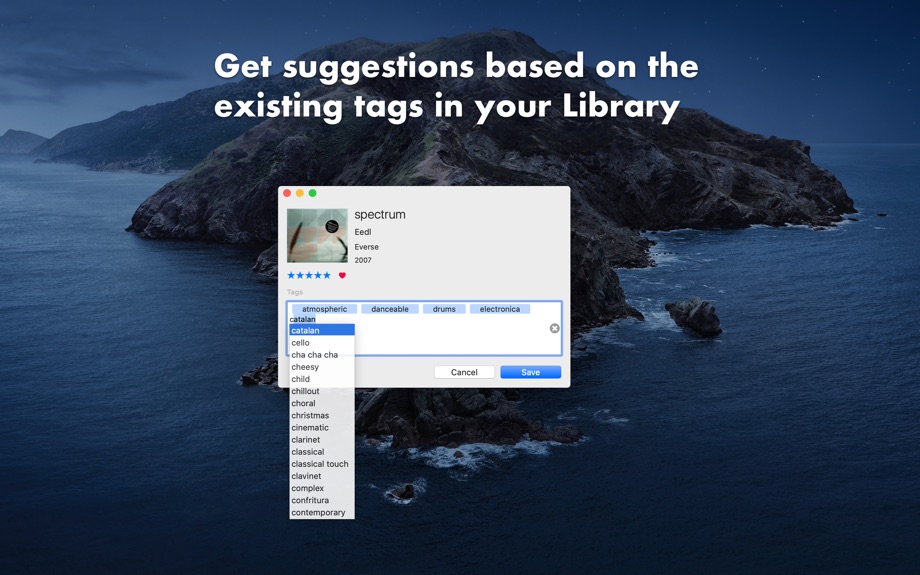
来自 App Store 商店页Enhance your Music Library experience by adding custom attributes (tags) and timed comments to your songs (1). Find your favourite songs later by searching for your tags or keywords directly in the Music app using Smart Playlists.
Anytime you’re listening to your music, use the configurable global shortcut (ctrl+alt+cmd+T by default) to quickly show MusicTagger and find details about the currently playing track and add or remove tags and comments.
Use the Timed Comments feature to add custom comments at specific times of the playing track and quickly jump to that part at anytime. This can be used, for instance, to mark an instrument solo section, different movements or passages in long tracks or whatever message that you want to link to that moment of the song.
Quickly filter all your songs with the Library Tags window and create a playlists based on tag combinations.
## How it works?
Custom Tags are stored in the track’s Grouping field with a specific format where each tag is wrapped by angle brackets.
This makes it convenient when searching tags within the Music app either by using smart playlists or by entering any tag in the search field since Music app also indexes the Grouping field.
Also, tags can coexist with any other existing Grouping content while there’s enough space to store them (2). In case the tags don’t fit the remaining space MusicTagger will inform you before saving so you can chose between discarding some tags or removing the existing grouping to make them fit.
When streaming music from your iCloud Library the tags and timed comments are also synchronized across devices. And when playing local files the tags are also written in the file's metadata.
## Features
* Works with the Music app and iCloud Music Library
* Configurable global shortcut
* Assign keywords to any track (Tags)
* Quickly play songs matching any combination of your tags
* Timed Comments: Add custom comments at specific parts of each track
* Click on any Timed Comment to play from that position
* Quick access for changing the rating and love status of the current song
* Tags and Comments are synchronized to other devices when using the iCloud Music Library
* Search for the current playing song on different online sites such as Discogs, Google or Youtube
* Keyboard shortcuts available for each control/action
* Stop after current song action
* Dark mode support
## Notes
* (1) Only works with tracks added to the user Music Library. Does not work with Apple Music tracks unless they’re added to the user iCloud Music Library.
* (2) The Music Library has a limitation of 255 characters in the Grouping and Comment fields to store content. Considering this, short-named tags and comments are preferred to avoid hitting this limit.
用户评价
0 条文字评价暂无文字评价
分享卡片 #
Instagram / 微博 / 小红书 会拉起系统分享并附带生成的卡片图
MusicTagger
工具
¥15.00
iOSAppGallerywww.iOSAppGallery.com


MusicTagger
工具
¥15.00
扫码查看详情
iOSAppGallery · iOSAppGallery.com
发现好玩的 iOS 应用与游戏
MusicTagger
工具
¥15.00
扫码查看详情
iOSAppGallery · iOSAppGallery.com
发现好玩的 iOS 应用与游戏
MusicTagger
工具
¥15.00
iOSAppGallerywww.iOSAppGallery.com



{"@context":"https://schema.org","@graph":[{"@type":"SoftwareApplication","name":"MusicTagger","applicationCategory":"\u5DE5\u5177","operatingSystem":"iOS","url":"http://www.iosappgallery.com/zh-CN/share/1488270140","image":"https://is1-ssl.mzstatic.com/image/thumb/Purple211/v4/f6/45/36/f6453671-82b9-87aa-e5f5-564296043880/AppIcon-0-0-85-220-0-0-5-0-2x.png/512x512bb.png","aggregateRating":null,"offers":{"@type":"Offer","price":15.000,"priceCurrency":"CNY"}},{"@type":"BreadcrumbList","itemListElement":[{"@type":"ListItem","position":1,"name":"Apps","item":"/"},{"@type":"ListItem","position":2,"name":"\u5DE5\u5177"},{"@type":"ListItem","position":3,"name":"MusicTagger"}]}]}