风格

截图
2 张截图 网格- 版本
- 1.11
- 大小
- 2 MB
- 首次发布
- 2026年8月12日
- 分类
- 软件开发工具
应用介绍
来自 App Store 商店页Netis is a lightweight macOS menu-bar utility that continuously scans your machine for running web servers and databases, then surfaces them where you can act on them in a single click - from the status bar, or from a full dashboard window when you want the bigger picture.
With Netis you can:
• Discover automatically - Netis sweeps loopback (and any extra hosts you add, like Docker bridge IPs or LAN machines) for the ports common dev tools and databases listen on. No need to pre-register anything; whatever's running shows up.
• Identify what's there - web services are fingerprinted from response headers and page content (Vite, Next.js, Nuxt, React, Django, Flask, Express, Uvicorn, Gunicorn, Caddy, Traefik, Nginx, Apache, Tomcat, Jetty, IIS, Hasura, PostgREST, Strapi, Supabase, n8n, Airflow, Jupyter, Grafana, Kibana, Prometheus, Jaeger, MinIO, Mailhog, Ollama, and more). Pure-TCP services are identified by protocol-aware banner probes (PostgreSQL, MySQL, MongoDB, Redis, Memcached, RabbitMQ, MS SQL, Cassandra, Neo4j, InfluxDB, ClickHouse, CouchDB, Couchbase, Solr, Etcd, Consul, Vault, Kafka, ZooKeeper - plus SSH, SMTP, FTP, POP3, IMAP, VNC).
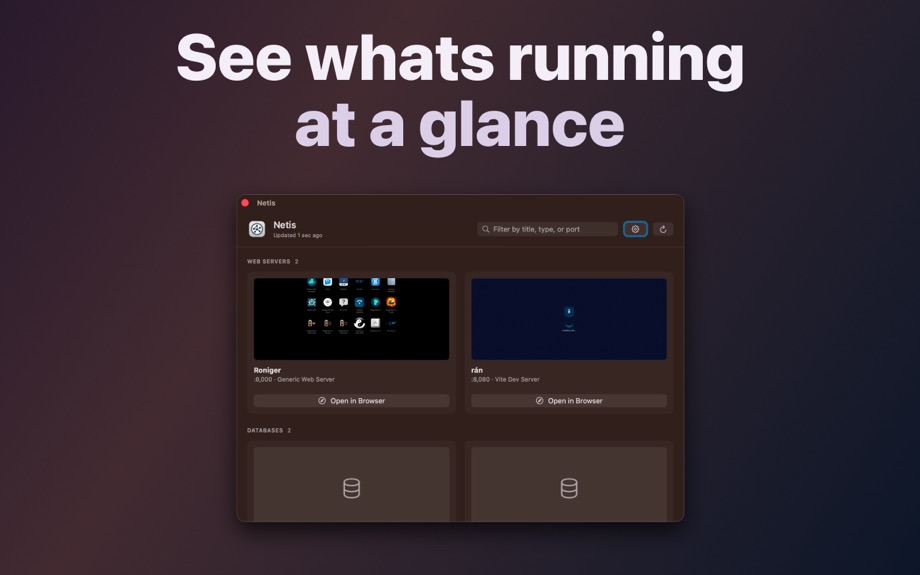
• See real screenshots - web previews render the page after its JavaScript runs, so React / Vue / Svelte / Angular SPAs show their actual UI instead of a blank shell. The page title appears above the service type in both the menu and the dashboard. Hover any web service in the status menu for a full-size preview popover.
• Open instantly - one click launches a web service in your default browser. For databases, Netis routes to the right SQL client (TablePlus, Postico, Sequel Ace, pgAdmin, Azure Data Studio, and more) - and if none is installed, jumps to a curated Mac App Store search.
• Two surfaces, your choice - run Netis as a pure menu-bar app, as a Dock app with a full dashboard window, or both. Toggle each independently. The dashboard shows every detected service as a card with a live preview and contextual action; a search field filters instantly by title, service type, or port.
• Customize precisely - add or mute individual ports, disable whole service categories without losing the catalog, edit the scan host list, hide unidentified TCP services, set Launch at Login. Right-click to copy a URL, copy host:port, or jump straight to a client. Manual Refresh (⌘R) forces a fresh probe whenever you want one.
• Private and lightweight - sandboxed, hardened, scans only the hosts you've configured (loopback by default). Netis collects no data, ships no analytics, and makes no outbound calls beyond the ones you've explicitly asked it to probe.
Ready to stop fumbling and start coding? Get Netis today and take full control of your local servers.
Netis is under active development. If you have a feature request, encounter an issue, hit a service we don't recognise yet, want to assist with localization, or just want to say hello, please reach out at [email protected].
用户评价
0 条文字评价暂无文字评价
分享卡片 #
Instagram / 微博 / 小红书 会拉起系统分享并附带生成的卡片图
Netis
软件开发工具
¥68.00
iOSAppGallerywww.iOSAppGallery.com

Netis
软件开发工具
¥68.00
扫码查看详情
iOSAppGallery · iOSAppGallery.com
发现好玩的 iOS 应用与游戏
Netis
软件开发工具
¥68.00
扫码查看详情
iOSAppGallery · iOSAppGallery.com
发现好玩的 iOS 应用与游戏
Netis
软件开发工具
¥68.00
iOSAppGallerywww.iOSAppGallery.com


{"@context":"https://schema.org","@graph":[{"@type":"SoftwareApplication","name":"Netis","applicationCategory":"\u8F6F\u4EF6\u5F00\u53D1\u5DE5\u5177","operatingSystem":"iOS","url":"http://www.iosappgallery.com/zh-CN/share/6746460467","image":"https://is1-ssl.mzstatic.com/image/thumb/Purple211/v4/c1/7e/0b/c17e0b5d-3cd3-bfef-9914-99ec3128f9c6/AppIcon-0-0-85-220-0-0-5-0-2x-0-0-0.png/512x512bb.png","aggregateRating":null,"offers":{"@type":"Offer","price":68.000,"priceCurrency":"CNY"}},{"@type":"BreadcrumbList","itemListElement":[{"@type":"ListItem","position":1,"name":"Apps","item":"/"},{"@type":"ListItem","position":2,"name":"\u8F6F\u4EF6\u5F00\u53D1\u5DE5\u5177"},{"@type":"ListItem","position":3,"name":"Netis"}]}]}