ReminderSync for Markdown turns the tasks in your notes into real Apple Reminders
ReminderSync for Markdown turns the tasks in your notes into real Apple Reminders. Write a task in Obsidian, Logseq or any Markdown editor and it appears in Reminders.app, with alerts, widgets, Siri and, via iCloud, your iPhone, iPad and Apple Watch. Complete it on either side and both stay in sync.

REMINDERS FOR MARKDOWN TASKS

Tasks created in Markdown documents will be added to Reminders.app

SUPPORTS ANY EDITOR

Use your favourite Markdown notes editor (e.g. Obsidian, Logseq, NotePlan, TaskPaper, Vim, Emacs, Visual Studio Code).

TWO WAY SYNCING

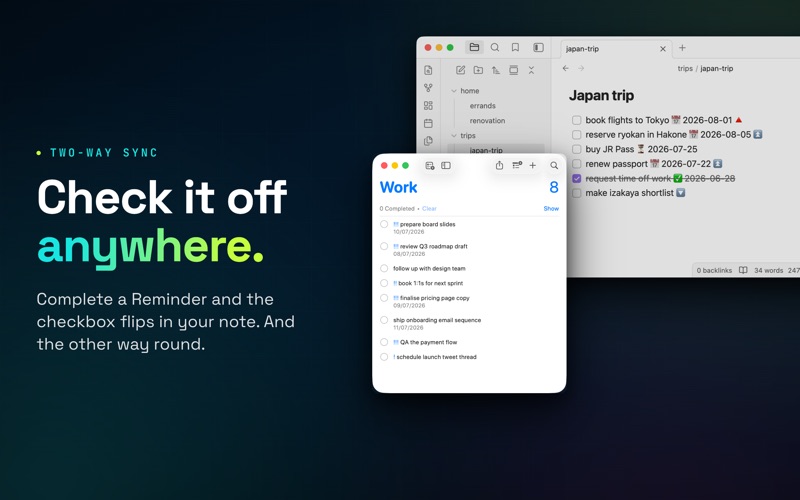
Completing a Reminder will complete the synced Markdown task, and completing the Markdown Task will complete the Reminder.

SUPPORTED TASK FORMATS

Task metadata (due date, scheduled date, priority, completion) is understood in five dialects:

- Obsidian Tasks emoji format (calendar-emoji dates and priority arrows)
- Obsidian Dataview format ([due:: 2026-07-10], [priority:: high])
- NotePlan (>2026-07-10 dates, @done, ! priorities)
- Logseq (native TODO/DOING/DONE bullets, DEADLINE and SCHEDULED, [#A] priorities)
- TaskPaper style @tags (@due, @defer, @done, @priority)

ROUTING RULES

Routing Rules allow you to:
- Ignore directories or files
- Send directories or files to different Reminder lists.


Reminder Sync Free allows you to:

- Sync Obsidian, Logseq, NotePlan and TaskPaper tasks to Apple Reminders
- Create Markdown Tasks from Apple Reminders
- Receive notifications for Tasks
- View your Tasks on iOS or macOS with Reminders + iCloud
- Complete Tasks in your Notes from Reminders

Pro Users get access to:

- Faster Sync intervals: check your Vault for new Tasks every minute
- Deletion Syncing: delete a synced Reminder to delete the Task from your Vault
- Enhanced Metadata: generate a description for Reminders
- Extra Task Formats: Dataview, NotePlan, Logseq and TaskPaper (free plan uses the emoji format)
- Routing Rules: Ignore directories, configure directories to sync to different lists.
- Global Task filter: only sync Tasks matching the filter
- Due Date filter: only sync Tasks that have a due date
- Kanban Skip: Skip Tasks in Obsidian Kanban boards.

_____

This application is not affiliated with or endorsed by Obsidian.md, Logseq, NotePlan, TaskPaper or Apple Reminders, but reads your Markdown Notes from your local filesystem and uses publicly available APIs to integrate with the Reminders App.

_____

Reminder Sync for Markdown uses the Standard EULA available at the address: https://www.apple.com/legal/internet-services/itunes/dev/stdeula/