


Description
LUT Converter makes it easy to translate your creative color looks between LUT formats
LUT Converter makes it easy to translate your creative color looks between LUT formats.
Whether you’re a filmmaker, photographer, or colorist, you can prepare LUTs for professional desktop applications such as DaVinci Resolve, Adobe Premiere Pro, and Final Cut Pro or mobile apps such as VideoLUT.

WIDE FORMAT SUPPORT
Import 20 LUT and color format types, including .cube, .3dl, .cub, and .look; PNG, JPEG, and TIFF LUT tables in Grid, Strip, and Hald layouts; ICC profiles; Panasonic .vlt; ASC CDL (.cdl, .cc, and .ccc); EDL/ALE files containing ASC CDL data; CineSpace .csp; Common LUT Format .clf; .spi1d and .spi3d; Iridas .itx; CSV; DaVinci .davlut; Nucoda .cms; and Resolve/FSI .dat.

Enable “Display all formats” in Settings to access the complete format list.

FLEXIBLE EXPORT
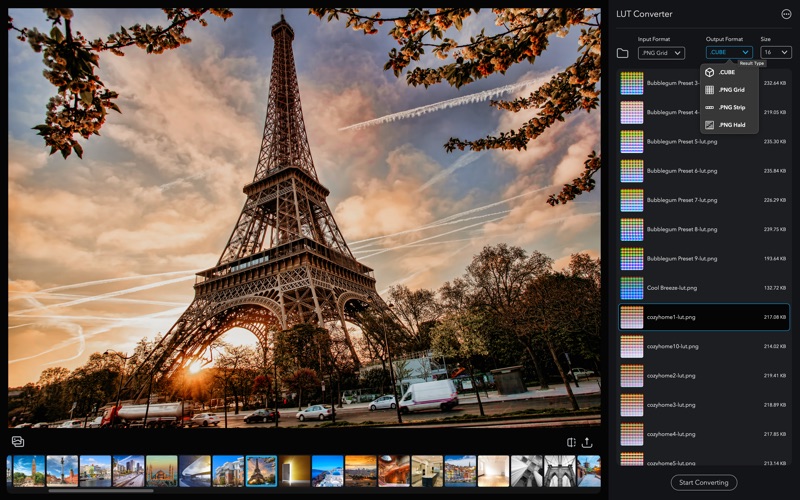
Export LUTs as .cube, .3dl, .cub, .look, or PNG tables in Grid, Strip, and Hald layouts.
For .cube files, choose a grid size of 16, 32, 33, or 64. Other output formats provide sizes appropriate to their layouts.
Create 33-grid .cube files for workflows such as Panasonic LUMIX Real Time LUT.

CONVERT ICC PROFILES
Convert .icc, .icm, .pf, and .prof color profiles directly to .cube or another supported output format.

BATCH CONVERSION
Select multiple LUTs—or all matching LUTs in a folder—and convert them together.

PREVIEW YOUR LOOKS
Preview .cube, .3dl, .cub, .look, and image-based LUT tables using your own PNG or JPEG images. Switch between Before and After views, then save the resulting image as a PNG.

SEND TO VIDEOLUT
Prepare up to 100 compatible LUTs as a VideoLUT-ready ZIP file. Save it to iCloud Drive, send it to your device with AirDrop, or open it in Apple Mail for transfer to VideoLUT.

LIGHTROOM CLASSIC PRESET CONVERSION
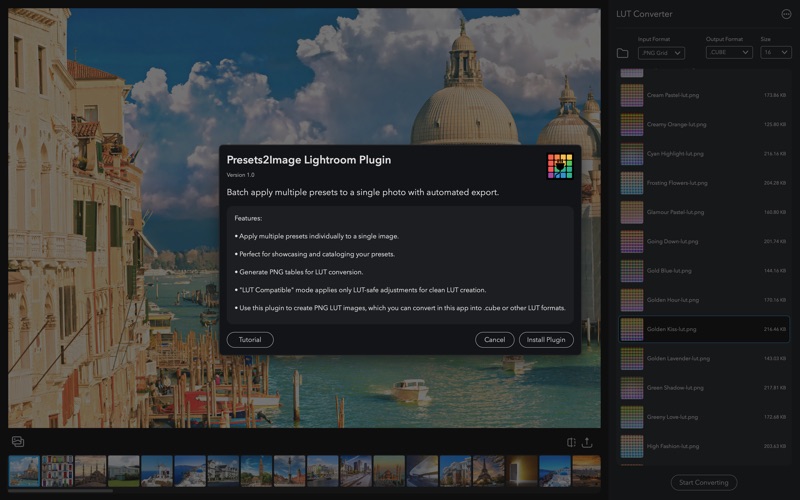
Install the included Presets2Image plugin from within LUT Converter. Apply Lightroom Classic presets to a LUT table, export them directly as .cube files, or continue refining them in LUT Converter.

USE YOUR LOOKS ANYWHERE
Your creative look shouldn’t be locked to one format. LUT Converter bridges the gap between applications, devices, and LUT representations—so you can use your favorite grades wherever you work.

Terms of Use (EULA):
https://www.apple.com/legal/internet-services/itunes/dev/stdeula/
CategoryLabel摄影与录像(28122)
VersionLabel1.15
BundleId: com.xcstudio.LUTConvert
DeveloperLabelEnrique Garcia
LastUpdatedLabel2025-11-25
