EcoEdge.io helps you quickly set up and reconfigure your EcoEdge smart devices
over Bluetooth (BLE).

Version 2.0 is a ground-up redesign with a guided, step-by-step setup and reusable
saved profiles — so bringing a new device online takes seconds.

GUIDED 3-STEP SETUP
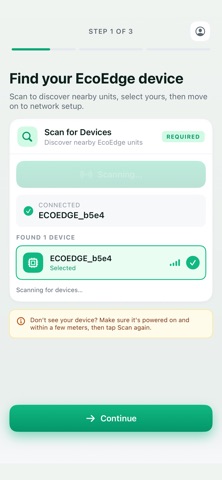
A clean flow walks you through it, with clear progress at every step:
1. Find your device — scan for nearby EcoEdge devices and pick yours, with signal
   strength shown for each.
2. Network & login — enter your Wi-Fi, MQTT, device login and optional syslog.
3. Review & save — confirm your settings; the device reboots to apply them.

SAVED LOCATION PROFILES (new)
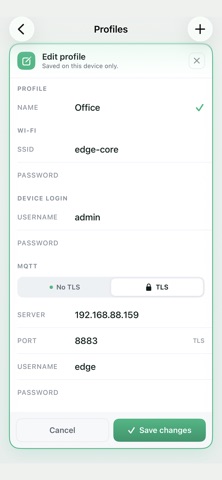
Save a place's settings as a named profile — Home, Office, Site B — and apply it
to a new device in one tap, with no re-typing your Wi-Fi, MQTT and login each
time. Create, edit and delete profiles whenever you like. Credentials are stored
securely on your device and are never shown in plain text.

EASILY CONFIGURE
• Wi-Fi connection — SSID, password, DHCP or static IP (address, netmask,
  gateway, DNS)
• MQTT — server, port, TLS toggle, username and password
• Web UI login credentials — hostname, username and password
• Syslog server for remote logging

BUILT FOR RELIABLE SETUP
• Clear connection status, with timeouts and an easy retry if a device is out of
  range
• Helpful guidance when Bluetooth is off or permission is needed
• An accurate confirmation once your settings are saved and the device reboots

EcoEdge.io makes it simple to get your devices online and integrated with your
smart home system, including Home Assistant and other MQTT platforms.