Converter, Editor & Signatures
Create high-quality PDFs from photos and documents, scan paper pages with automatic edge detection, organize page structure, and add reusable signatures – using a focus
Converter, Editor & Signatures

Create high-quality PDFs from photos and documents, scan paper pages with automatic edge detection, organize page structure, and add reusable signatures – using a focused set of tools designed for everyday and professional document workflows.

Convert to PDF
1. Convert photos and documents into high-quality PDF files
2. Supported formats include images (.jpg, .png), text and web files (.txt, .html), and office documents (.docx, .xls), enabling conversion from multiple content types into a single PDF format
3. Import files by capturing new images with the camera or selecting existing content from your device or connected sources
4. Before creating the final PDF, adjust page sequence, combine multiple inputs into one document, or split content into separate files as needed

Scan Documents
Scan documents using your device camera with automatic document edge detection

Document Manager
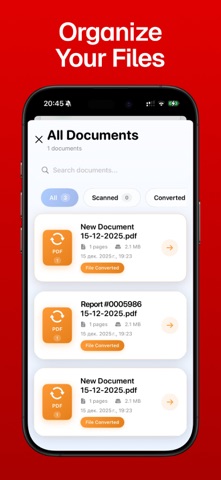
– Access all documents created in the app
– Sort by date, format, or type (scanned, edited, signed)
– Search by name and manage files with options to delete, rename, or share

Add Signatures
– Create signatures in a dedicated section using your finger or Apple Pencil
– Save signatures for future use and insert them into PDF files when needed

Basic Version (Free)
• 1 PDF creation included
• Includes PDF creation from images and documents
• Includes document scanning with automatic edge detection
• Access to document preview, page reordering, and file management tools
• Ability to create and use signatures

Premium Version (Paid)
• Unlimited conversions and document scans
• No limits on the number of processed files or pages
• Full support for all available import formats (including .docx, .txt, .html, .xls, and others)
• Access to importing from all supported sources, including cloud services
• Unrestricted use of editing tools (reorder, add/remove pages, rename files)
• Unlimited use of saved signatures across documents

Photo to PDF - Converter Scan offers a structured and efficient way to prepare, organize, and finalize PDF documents for storage or sharing.

Privacy Policy: https://docs.google.com/document/d/1CB_2_6EvVw3ZtoH_stpf-q77QFvE708u3TfuwJQszOw/edit?usp=sharing
Terms & Conditions: https://docs.google.com/document/d/1B4OTsoMGx92aV7YHLPUl6yJsqVMIYvwAHlnAdIsdACQ/edit?usp=sharing