Lost your cursor again? Of course you did. It's somewhere on screen two. Or three. Or four.

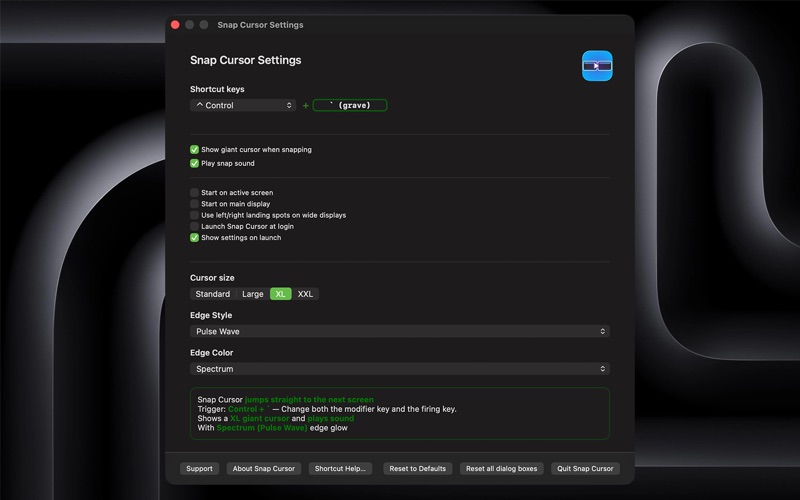
Snap Cursor fixes that. Hit Control + ` (that little accent grave key nobody uses) and BOOM!

Your cursor teleports to the next display. No dragging across edges. No squinting at a 49-inch monitor for a 12-pixel arrow. Just tap, and you're there.

Globally hit Control key and ` (accent grave) and your cursor jumps to the next screen. No dragging across edges, no hunting for a tiny arrow on a massive desktop. Just tap.

Here's your life before Snap Cursor:
- Have two screens. Important window is out of sight…on screen two
- Look back at screen one. Where is that cursor? It's not on screen two.
- Shake the mouse. Find the cursor. It's still not on screen two.
- Move the mouse…and move it. And finally, it's on Screen two

OR

Press Ctrl + ` and Boom - it's on the next screen.

WORKS HOWEVER MANY SCREENS YOU'VE GOT

Whether you have two monitors or five, SnapCursor cycles through them in order. It's fast, simple, and stays out of your way until you need it.

SEE WHERE YOU LAND

When your cursor snaps to a new display, a giant cursor and a subtle glow appear briefly so you can spot it immediately. No more losing track of where you ended up.

AUDIO CUES

Turn on optional sound effects to hear when your cursor moves. Helpful when you're focused on one screen and need to snap to another without looking.

CUSTOMIZABLE

- Choose your modifier key (Control + ` is the default)
- Adjust cursor size for the snap animation.
- Toggle the glow, sound, and giant cursor on or off.
- Set SnapCursor to launch at login.

LIGHTWEIGHT AND NATIVE

It lives quietly in your menu bar, and does one thing absurdly well. (And no, it's not using AI to move your mouse. Not today. Not ever)

Built for anyone who works across multiple screens and wants to stop searching for the mouse.