
Offscroll: Screen Time Budget
0.0 3.95MB 0 Free
Version 1.4
Updated 2026-07-21
Developer Noah Escobedo




Description
Built for the people screen-time apps failed
Built for the people screen-time apps failed. If you have ever turned off your own limit, this was made for you.

A budget, not a block.

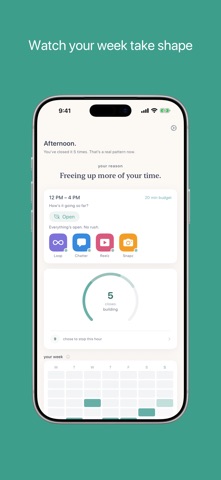
You set a time budget for the apps that pull you in. Use them freely. When the budget runs out, Offscroll doesn't lock you out. It asks you to pause, then hands the choice back to you.

Most apps here work by restriction. They block, lock, or punish. That works for some people, but it tends to fail the ones who need it most. Willpower against an algorithm is a losing fight, and being shut out of your own phone usually just leads to shame and a workaround.

Offscroll is different.

How it works
- Pick the apps you want to use less. Instagram, TikTok, X, YouTube, whatever yours are.
- Set a time budget per 4-hour window. Start with what feels honest.
- When your budget runs out, a calm pause appears with two choices: close the app, or take a moment.
- If you stay, you'll see a short breathing animation and a line written to reconnect you with why you picked up your phone.
- Then you decide. Close it, or add 5 more minutes. You're never locked out.

What you'll notice
- Sessions get shorter. Not because you're forced to stop, but because the pause makes the choice conscious.
- Your dashboard shows closes, estimated time saved (every number marked with a ~, with a one-tap explainer), and a weekly view of your windows.
- The reflection message that appears adapts over time to what has actually helped you close the app before.
- A quiet, anonymous signal that someone else, somewhere, just chose to stop too. No usernames. No leaderboards. Just proof you're not alone.

Free, for real
Every core feature is free. Budgets, the pause, the dashboard, the streak, the breathing exercise. All of it.

Community Tier ($2.99/month or $23.99/year)
See what tends to help you. After a few weeks, your pause history starts to show a pattern. Which kinds of moments closed the app. Which ones did not. Subscribers see that breakdown, personal and private, built from their own pauses. If you want, you can also become a Contributor: write the lines that helped you, share them with the community, and see how many people closed an app after reading them.

Built with care
Offscroll uses Apple's Family Controls. Your watchlist and usage stay on your device. Community contributions are moderated before anyone sees them.

Your phone. Your rules.

Subscription auto-renews unless cancelled at least 24 hours before the end of the period. Manage in your App Store account settings.
Terms: https://offscrollapp.com/terms
Privacy: https://offscrollapp.com/privacy
CategoryLabel效率(96543)
VersionLabel1.4
BundleId: com.noahesco.offscroll
DeveloperLabelNoah Escobedo
LastUpdatedLabel2026-07-21
