
Pilot Flows - Learn Your Plane
0.0 14.68MB 0 Free
Version 1.6.0
Updated 2026-07-29
Developer Sebastian Rubina



Description
Pilot Flows - Learn Your Plane Master your cockpit flows by building interactive checklists directly on your cockpit photo
Pilot Flows - Learn Your Plane

Master your cockpit flows by building interactive checklists directly on your cockpit photo.

How it works:
• Import a photo of your cockpit, then tap to place numbered steps on switches, knobs, and displays. Organize steps into color-coded subflows with section dividers. Connect the dots (literally) with automatic flow arrows that show the sequence at a glance.

Practice until it's second nature:
• Practice Mode: follow along step by step with on-screen prompts
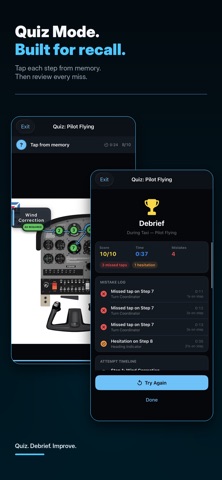
• Quiz Mode: test yourself from memory with no hints
• Random Find-It: locate steps in shuffled order
• Slideshow: present flows step by step for classroom instruction
• Track your scores and progress over time

Built for pilots, by a pilot:
• Works with any aircraft: GA, turboprop, jet, or simulator
• Multiple subflows per procedure (Pilot Flying, Pilot Monitoring)
• Section dividers to organize complex flows
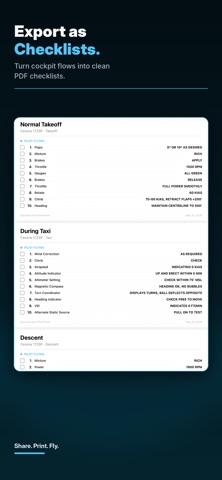
• Export as image or print-ready PDF checklist
• iCloud sync across iPhone and iPad
• Dark-themed UI designed for readability

A subscription is required to use the application.

Pilot Flows Pro: $5.99/week or $49.99/year:
• Unlimited aircraft and flows
• Clean exports without watermark
• Payment is charged to your Apple ID. Subscriptions auto-renew unless cancelled at least 24 hours before the end of the current period. Manage subscriptions in Settings → Apple ID → Subscriptions.


T&C: https://github.com/SebastianRubina/pilotflows-legal/blob/main/terms-and-conditions.md
Privacy Policy: https://github.com/SebastianRubina/pilotflows-legal/blob/main/privacy-policy.md
EULA: https://www.apple.com/legal/internet-services/itunes/dev/stdeula/
CategoryLabel教育(155215)
VersionLabel1.6.0
BundleId: com.sebastianrubina.pilot-flows
DeveloperLabelSebastian Rubina
LastUpdatedLabel2026-07-29
