


Description
Point your camera at anything and instantly extract a beautiful colour palette
Point your camera at anything and instantly extract a beautiful colour palette.
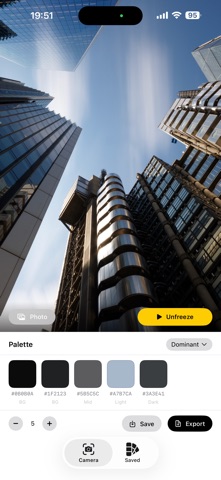
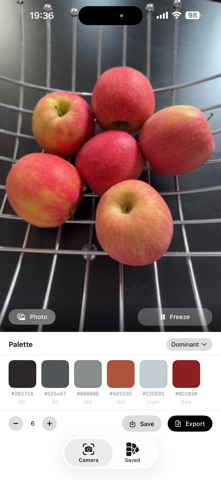
ColourSnapper analyses the live camera feed using colour clustering, giving you
the dominant colours from any scene, object, or photo in real time.

LIVE CAMERA EXTRACTION
• Real-time colour sampling from the live camera feed
• Freeze the frame to lock in a scene for closer analysis
• Import any photo from your library as an alternative source
• Extract 2–12 colours — adjust the count with +/− controls

COLOUR THEORY MODES
Apply seven classic colour theory rules to any palette with a single tap:
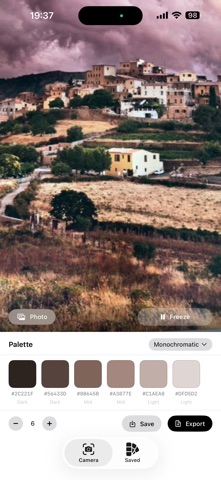
• Dominant — the most frequent colours extracted from the scene
• Complementary — one colour and its opposite on the colour wheel
• Analogous — three adjacent colours for natural, harmonious palettes
• Triadic — three evenly-spaced colours (120°) for bold contrast
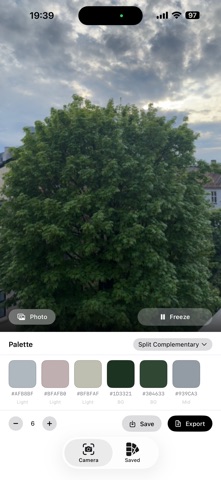
• Split Complementary — a base colour plus two near its complement
• Tetradic — four colours in a rectangle formation (90° spacing)
• Monochromatic — variations of a single hue across lightness levels

COLOUR SWATCHES & DETAILS
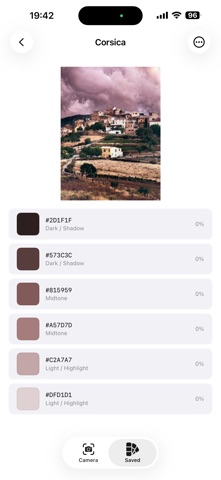
• Hex codes displayed on every swatch — tap to copy instantly
• Role labels: Dark/Shadow, Midtone, Light/Highlight, Background candidate
• Frequency percentage showing how much of the scene each colour covers
• Auto-contrast text on swatches for readability on any colour

EXPORT IN THREE FORMATS
• TOML — structured data with name, date, RGB, HSL, frequency, and role tags
• Hex List — plain text, one hex code per line, ready to paste anywhere
• CSS — CSS custom properties in a :root block with inline comments
Share via the iOS Share Sheet or copy directly to the clipboard.

PALETTE LIBRARY
• Save any palette with a custom name
• Browse your saved palettes in the Saved tab
• View full colour details and the original source photo for each palette
• Rename or delete palettes at any time
• Palettes stored locally on-device as JSON — no account required
分类: 工具(185746)
版本: 1.0
BundleId: com.andreasoverland.ColourSnapper
开发者: Andreas Overland
最近更新: 2026-05-26
