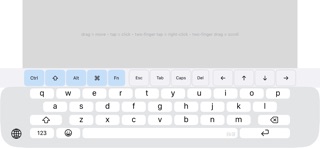
Turn your iPhone into a wireless Bluetooth keyboard and trackpad.

TYPE INTO A PC, SMART TV OR RASPBERRY PI
These see your iPhone as an ordinary Bluetooth keyboard + mouse — nothing to install on them. Just pair from their Bluetooth settings (your iPhone shows up under its own name) and start typing and pointing.

TYPE INTO AN iPad OR ANOTHER iPhone
Install the app on both devices. Leave your iPhone in Keyboard mode, switch the other device to Receive mode, and it connects automatically — your iPhone then becomes that device's keyboard and trackpad, in any app.

Got an Android phone? It works too: with our AndroHID app, an Android phone can be the keyboard and trackpad for your iPhone or iPad.

KEYBOARD
• Your normal iPhone keyboard — every language, emoji and dictation
• Dedicated Ctrl, Shift, Alt and ⌘ modifier keys — tap a modifier, then a key for shortcuts like ⌘+Tab or Ctrl+C
• Fn row for F1–F12, plus Esc, Tab, Caps Lock, Delete and a full arrow cluster
• Every keystroke is sent as a real Bluetooth HID report

TRACKPAD
• Multi-touch trackpad surface for precise pointer control
• One-finger drag to move, tap to click
• Two-finger tap to right-click, two-finger drag to scroll
• Trackpad sits above the keyboard in landscape so you can type and point at once

MULTIPLE DEVICES
• Stay connected to several devices at once and choose which one receives your input
• Rename each device so you always know which is which

PRIVACY
• No accounts, no servers, no tracking
• Your keystrokes go straight to the paired device over an encrypted Bluetooth connection — never recorded, never uploaded

Free to use 10 minutes per day. A single one-time in-app purchase unlocks unlimited use — no subscription.