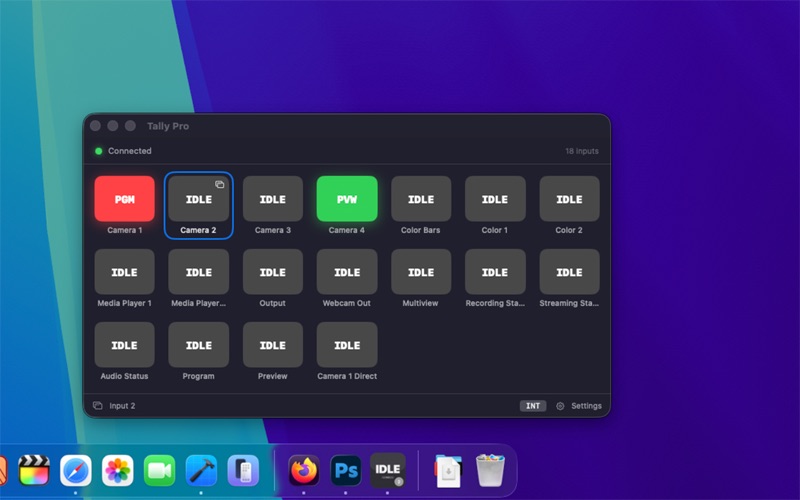
Turn your Dock icon into a live tally light for any BlackMagic ATEM switcher, no hardware required
Turn your Dock icon into a live tally light for any BlackMagic ATEM switcher, no hardware required.

ATEM Tally Light connects to your ATEM switcher over your local network and reads the real-time tally state for every input. At a glance, you'll see which camera is on Program (red), which is on Preview (green), and which is safe — all from a compact panel that stays out of your way.

HOW IT WORKS
Enter your ATEM's IP address, select the input you want to monitor, and connect. The app establishes a low-latency UDP connection directly to the switcher on port 9910, the same protocol the ATEM hardware uses. No third-party software, no cloud, no subscriptions.

FEATURES
• Live tally for all ATEM inputs simultaneously
• Named inputs pulled directly from the switcher (Camera 1, Graphics, etc.)
• Dock icon updates in real time, red for Program, green for Preview, grey for safe
• Automatic reconnection if the network drops
• Remembers your last used IP address
• Zero configuration beyond your ATEM's IP

WHO IT'S FOR
Live production crews, church AV teams, corporate event operators, broadcasters, and anyone running a BlackMagic ATEM switcher who wants a quick at-a-glance tally monitor on their Mac.

COMPATIBILITY
Works with the full ATEM product family: ATEM Mini, Mini Pro, Mini Extreme, Television Studio series, Constellation, and more. If your ATEM has a network port and runs firmware that speaks the ATEM SDK protocol, it works.

Requires a local network connection to your ATEM switcher. The switcher and computer must be on the same network segment.