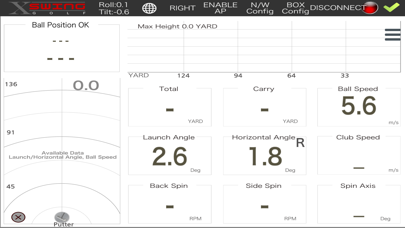
1. This App displays shot information from the provided
  camera sensor(It is sent to the address you
  designated). The shot data will be made from the
  golfer.
2. The target hardware is the iPad air or the hardware
   with higher power than this. It is because hardware
   device with low power takes too much time to
   process shot data.
3. How to test
 3.1. Turn on the sensor. You can find the power button
      on the right side of the sensor.
 3.2. When you need to recharge it, you can do it by
      by connecting the sensor using USB cable. The
      slot for USB cable is under the power button.
 3.3. After turning on the power, on your device, you
      will find the wifi starting with "SkyTrak...." in the
      wifi list. Please connect to this wifi.
 3.4. Now start the app. Then hit the discover button. It
    is located on the top right side.
 3.5. This will pop up a window with the wifi name you
   selected on the device.
 3.6. Tab on the wifi name. This will make the app
   connect to sensor and relevant icon will replace the
   "x" icon.
 3.7. Now when everything is done correctly, three
   lamps light will be all green and laser will point
   a spot.
 3.8. Place the golf ball(or any ball with similar size,
   such as table tennis ball) on the spot the laser beam
   indicates.
 3.9. Hit the ball with rather high speed.
 3.10. It will first display the ball speed, launch angle,
   horizontal angle. After few seconds, it will display
   such as spin values, carry, total, trajectory lines, etc.