风格

截图
8 张截图 网格- 版本
- 1.3 build 16
- 大小
- 3 MB
- 首次发布
- 2026年4月24日
- 分类
- 软件开发工具
应用介绍
来自 App Store 商店页Transform Your Mac Into a Powerful Coding Workstation
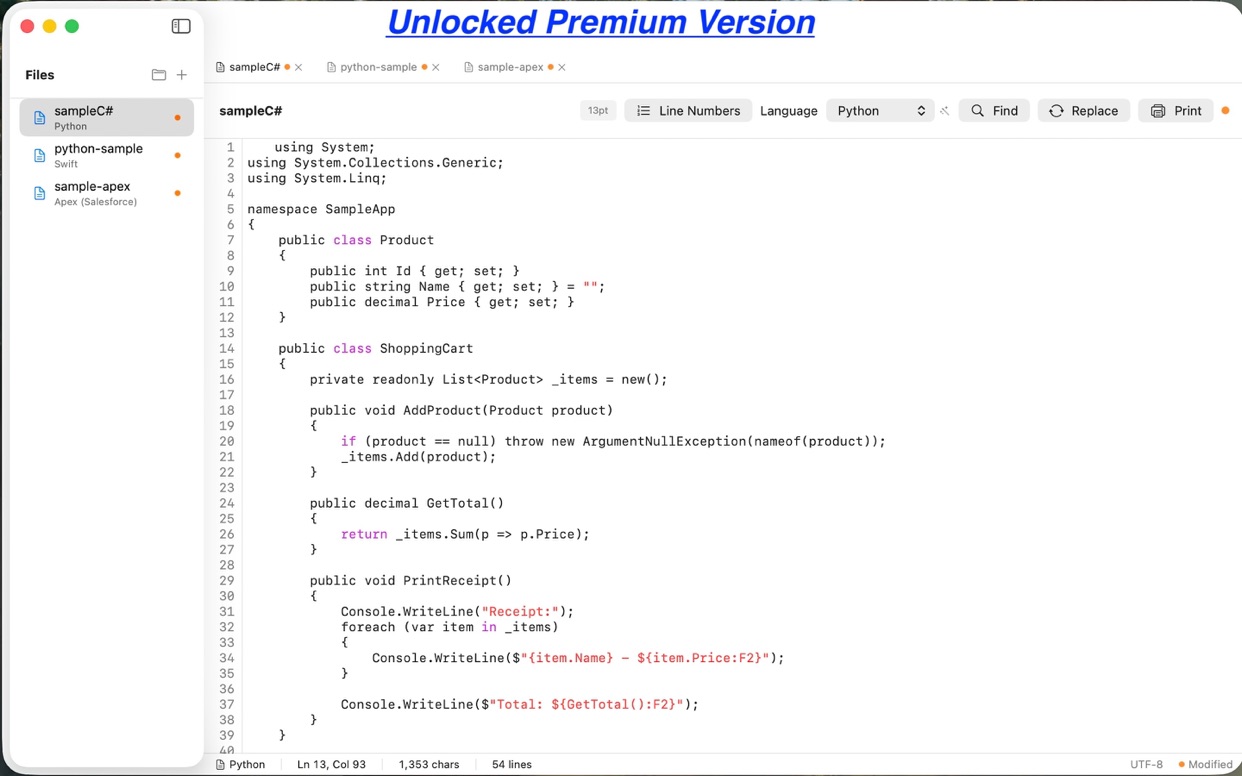
Clarity Code is a native macOS code editor designed for developers who value clarity, speed, and simplicity. Whether you're writing Swift, Python, JavaScript, C#, or any of 20+ supported languages, Clarity Code provides intelligent syntax highlighting and smart language detection to keep you focused on what matters: your code.
INTELLIGENT LANGUAGE DETECTION
Paste code and watch Clarity Code automatically detect the language. Advanced content analysis recognizes patterns from Swift to Salesforce Apex, ensuring accurate syntax highlighting every time.
FREE TIER - GET STARTED TODAY
• Markdown editing with live formatting
• JSON and XML with structure highlighting
• CSV file editing
• Plain text editing
• Unlimited files and projects
• Save, open, and print documents
• Full keyboard shortcuts (Cmd+N, Cmd+O, Cmd+S, Cmd+P)
PREMIUM - UNLOCK FULL POWER
Upgrade once to unlock professional features forever:
20+ Programming Languages:
• Swift, Python, JavaScript, TypeScript
• Java, C#, C, C++
• Go, Rust, Ruby, PHP
• Salesforce Apex (classes and triggers)
• SQL, HTML, CSS
• And more!
Developer Tools:
• Intelligent code completion
• Find and replace with regex support
• Professional syntax highlighting
• Print with preserved formatting
• Monospaced font with line numbers
• Real-time language detection
DESIGNED FOR macOS
• Native NSTextView for smooth scrolling
• Full keyboard shortcut support
• System-level undo/redo
• Standard macOS print dialogs
• Retina-optimized interface
• Light and dark mode support
PERFECT FOR:
• Learning to code in multiple languages
• Quick edits without heavy IDEs
• Reviewing code from colleagues
• Salesforce developers (Apex support!)
• Web developers (HTML, CSS, JavaScript)
• Data scientists (Python, SQL, CSV)
• Students and educators
• Anyone who writes code
PREMIUM FEATURES IN DETAIL
Advanced Syntax Highlighting: Over 20 languages with carefully crafted color schemes that highlight keywords, strings, comments, functions, and more.
Auto Language Detection: Paste any code snippet and watch Clarity Code analyze the content to determine the language automatically. No more manual selection needed.
Code Completion: Context-aware suggestions for keywords, functions, and common patterns in all supported languages. Boost your productivity with intelligent autocomplete.
Find and Replace: Powerful search with support for case-sensitive matching, whole word matching, and regular expressions.
Salesforce Apex Support: First-class support for Salesforce developers with .cls and .trigger file recognition, SOQL highlighting, and Apex-specific code completion.
FILE MANAGEMENT
• Open multiple files simultaneously
• Sidebar file organization
• Save files with Cmd+S
• Context menu actions
• File modification indicators
• UTF-8, ASCII, and Latin-1 encoding support
KEYBOARD SHORTCUTS
Cmd+N - New File
Cmd+O - Open File
Cmd+S - Save File
Cmd+P - Print
Cmd+F - Find (Premium)
Cmd+Z - Undo/Redo
PERFORMANCE AND RELIABILITY
Built with Swift and native macOS frameworks for exceptional performance. No Electron, no web wrappers - just pure native code that respects your Mac's resources.
ONE-TIME PURCHASE
No subscription. Pay once, own forever. Premium features unlock across all your Macs via Family Sharing.
PRIVACY FIRST
Your code never leaves your Mac. No cloud sync, no data collection, no analytics. What you write is yours alone.
Start coding smarter today with Clarity Code - where clarity meets capability.
用户评价
0 条文字评价暂无文字评价
分享卡片 #
Instagram / 微博 / 小红书 会拉起系统分享并附带生成的卡片图
Clarity Code Edit
软件开发工具
免费
iOSAppGallerywww.iOSAppGallery.com


Clarity Code Edit
软件开发工具
免费
扫码查看详情
iOSAppGallery · iOSAppGallery.com
发现好玩的 iOS 应用与游戏
Clarity Code Edit
软件开发工具
免费
扫码查看详情
iOSAppGallery · iOSAppGallery.com
发现好玩的 iOS 应用与游戏
Clarity Code Edit
软件开发工具
免费
iOSAppGallerywww.iOSAppGallery.com




{"@context":"https://schema.org","@graph":[{"@type":"SoftwareApplication","name":"Clarity Code Edit","applicationCategory":"\u8F6F\u4EF6\u5F00\u53D1\u5DE5\u5177","operatingSystem":"iOS","url":"http://www.iosappgallery.com/zh-CN/share/6761902741","image":"https://is1-ssl.mzstatic.com/image/thumb/Purple211/v4/29/48/c9/2948c988-c877-02f2-0f30-486ea567c374/AppIcon-0-0-85-220-0-5-0-2x.png/512x512bb.png","aggregateRating":null,"offers":{"@type":"Offer","price":0.000,"priceCurrency":"CNY"}},{"@type":"BreadcrumbList","itemListElement":[{"@type":"ListItem","position":1,"name":"Apps","item":"/"},{"@type":"ListItem","position":2,"name":"\u8F6F\u4EF6\u5F00\u53D1\u5DE5\u5177"},{"@type":"ListItem","position":3,"name":"Clarity Code Edit"}]}]}