风格

截图
9 张截图 网格- 版本
- 1.5.1
- 大小
- 41 MB
- 首次发布
- 2026年8月9日
- 分类
- 软件开发工具
应用介绍
来自 App Store 商店页Cuevello turns your device into a fast local control surface for the Mac you already use.
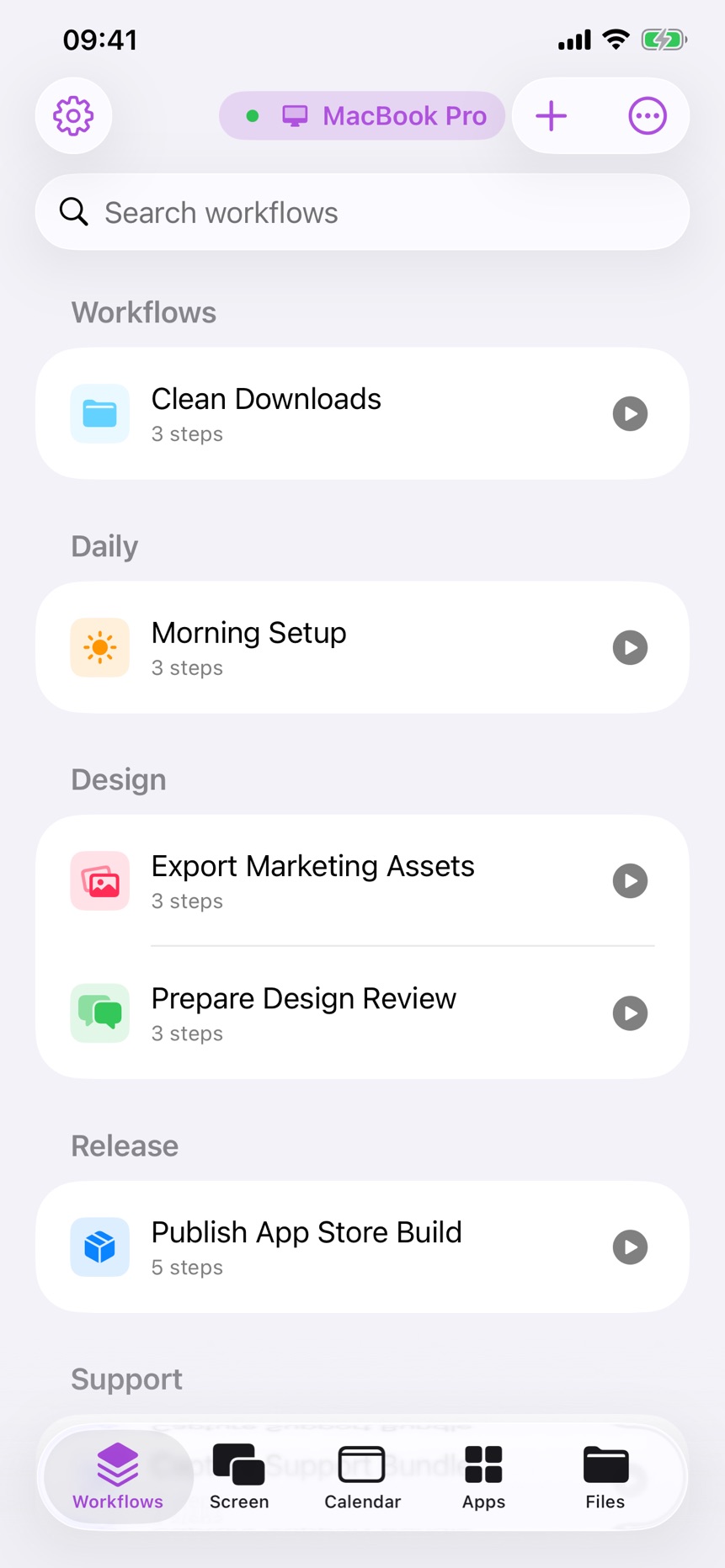
Pair your Mac locally, stream a monitor or app window, browse the menu of the active app, run menu commands, trigger keyboard shortcuts, open URLs, send text to the Mac clipboard, switch apps, and save repeatable routines as workflows.
Cuevello is made for the small Mac actions that interrupt your flow: checking a build, watching the iOS Simulator from iPad, opening a project URL, exporting a file, pasting text into a Mac app, dismissing a blocking dialog, or starting a prepared automation from across the room.
What Cuevello does:
- Stream and control a paired Mac screen
- View a monitor, app window, or selected app
- Use fullscreen or Picture in Picture for live streams
- Run Mac menu commands from your device
- Browse the active app's menus and submenus
- Trigger keyboard shortcuts from the app menu
- Build workflows with screen streams, menu commands, app actions, URLs, dynamic menu choices, clipboard text, and prompts
- Launch saved workflows from shortcuts and widgets
- Sync workflows between your devices
- Open URLs on the paired Mac
- Send text to the Mac clipboard
- Switch, open, or quit Mac apps
- Keep separate setups for multiple Macs
- Detect modal windows that block automation
Cuevello works locally. The Mac app publishes a local service, and your device connects on the same local network or through your VPN.
Use it for:
- Following up after AI-assisted work
- Checking local builds away from the desk
- Running saved shortcuts and Cuevello widgets from your device
- Sending text snippets to the macOS Clipboard before pasting
- Sending files to the Mac or downloading local Mac files
- Checking monitor screenshots before the next remote step
- Driving demos without breaking presentation focus
- Repeating export, share, archive, or render workflows
- Controlling a desk Mac, build Mac, or media Mac from one device
Requirements:
- Cuevello Mac app running on the Mac
- Device on the same local network as the Mac
- Accessibility permission on macOS so Cuevello can read and trigger menu items
- Local Network permission on the device for discovery and pairing
- Secure pairing for end-to-end encrypted transfers between paired devices
用户评价
0 条文字评价暂无文字评价
分享卡片 #
Instagram / 微博 / 小红书 会拉起系统分享并附带生成的卡片图
Cuevello Remote Menu & Screen
软件开发工具
免费
iOSAppGallerywww.iOSAppGallery.com


Cuevello Remote Menu & Screen
软件开发工具
免费
扫码查看详情
iOSAppGallery · iOSAppGallery.com
发现好玩的 iOS 应用与游戏
Cuevello Remote Menu & Screen
软件开发工具
免费
扫码查看详情
iOSAppGallery · iOSAppGallery.com
发现好玩的 iOS 应用与游戏
Cuevello Remote Menu & Screen
软件开发工具
免费
iOSAppGallerywww.iOSAppGallery.com



{"@context":"https://schema.org","@graph":[{"@type":"SoftwareApplication","name":"Cuevello Remote Menu \u0026 Screen","applicationCategory":"\u8F6F\u4EF6\u5F00\u53D1\u5DE5\u5177","operatingSystem":"iOS","url":"http://www.iosappgallery.com/zh-CN/share/6771413710","image":"https://is1-ssl.mzstatic.com/image/thumb/Purple221/v4/2c/18/3a/2c183a46-523f-6223-a612-b07c000a96f4/AppIcon-0-0-1x_U007epad-0-1-sRGB-85-220.png/512x512bb.jpg","aggregateRating":null,"offers":{"@type":"Offer","price":0.000,"priceCurrency":"CNY"}},{"@type":"BreadcrumbList","itemListElement":[{"@type":"ListItem","position":1,"name":"Apps","item":"/"},{"@type":"ListItem","position":2,"name":"\u8F6F\u4EF6\u5F00\u53D1\u5DE5\u5177"},{"@type":"ListItem","position":3,"name":"Cuevello Remote Menu \u0026 Screen"}]}]}